Insert reusable text in any app, instantly.
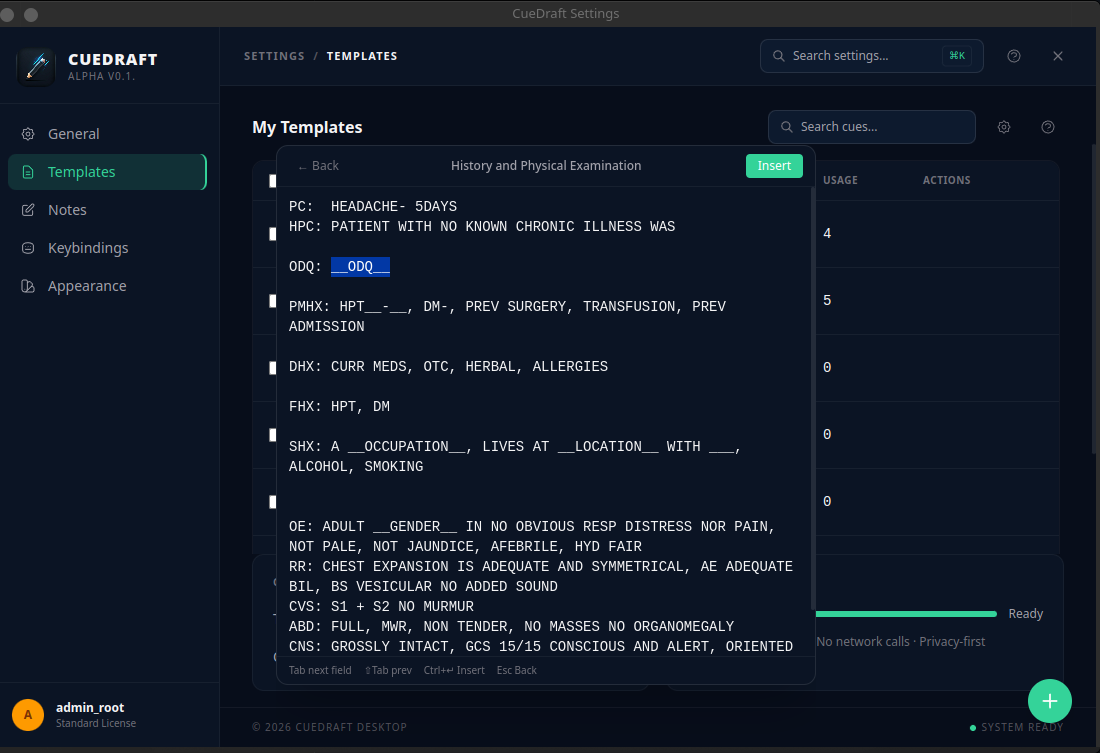
Save replies, notes, and templates once. Open CueDraft from anywhere, search what you need, and insert it into email, chat, docs, forms, or your IDE in seconds.
Why it matters
Stop rewriting the same thing all day.
Email and chat replies
Reuse common responses, follow-ups, intros, and status updates without hunting through old messages.
Notes and documentation
Drop in recurring meeting notes, project updates, checklists, and structured writeups in seconds.
Forms, tickets, and repetitive fields
Insert boilerplate with fill-in fields for names, dates, IDs, and other details without manual edits.
How it works
Three steps from idea to inserted text
Open CueDraft
Launch it from anywhere with your hotkey.
Find your snippet
Search by title, content, or category in a few keystrokes.
Insert and move on
Press Enter to insert it instantly. If needed, fill variables first.
Why CueDraft
Built for repeated writing, not repeated effort.
Works in every app
Use saved text in email, chat, docs, browsers, terminals, and IDEs from one keyboard-driven flow.
Find the right snippet fast
Search your saved content instantly by title or text so you can stay in flow.
Organize by context
Group snippets into categories like Work, Support, Personal, or Projects to reduce clutter.
Handle fill-in details cleanly
Use variables for names, dates, IDs, and project details so reusable text still feels specific.
Private by default
Your snippets stay on your machine with no telemetry, accounts, or cloud sync.
Runs locally on Windows and Linux
Install once and keep your snippet library available system-wide.
Private by default, not as an afterthought.
CueDraft is for text you use every day, including things you do not want passing through someone else's servers. Everything stays local, with no account, no sync dependency, and no telemetry.
Get started
Start using CueDraft in minutes
Free download. Open source. No signup required.
This is alpha software. You may encounter bugs or rough edges. Back up anything important before use, and report issues on GitHub.
.AppImage Runs on any Linux distro. No install needed — just mark executable and run.
.deb Install system-wide with dpkg. Integrates with system package management.
.exe NSIS installer. Installs to %LOCALAPPDATA%\Programs\CueDraft. Launch at startup optional.
All releases are available on GitHub Releases.